
Public GitHub Action alpha
ET Verify
The coding agent says it’s done.
Verify checks the report before you merge.
An independent GitHub check for coding-agent pull requests.
ET Verify runs in the pull-request workflow and reports its result inside GitHub.
Public repository: https://github.com/empoweredtextlabs/et-verify
uses: empoweredtextlabs/et-verify@474a1d79599a714ccb2cac28a0b34c1444ad86c7This is the immutable Action pin. Setup also requires a pull-request workflow and trusted check configuration.
Why use it?
A coding agent says the work is done and reports what it did. ET Verify adds an independent GitHub check of that completion report before merge.
The report is a practical checkpoint between the agent’s work and whatever gets built on top of it next. ET Verify handles the completion-report checks it can perform mechanically, so whatever review your team does can stay focused on judgment.
The check earns its place if it surfaces issues that matter in your workflow. You decide what the result is worth.
What it can catch
ET Verify can catch concrete mismatches that are easy to miss in a completion report.
Changed more than reported
The declaration says two files changed; Git shows four.
ET Verify can catch the mismatch by comparing the agent’s changed-file claim with the actual changed paths.
A required check was left out
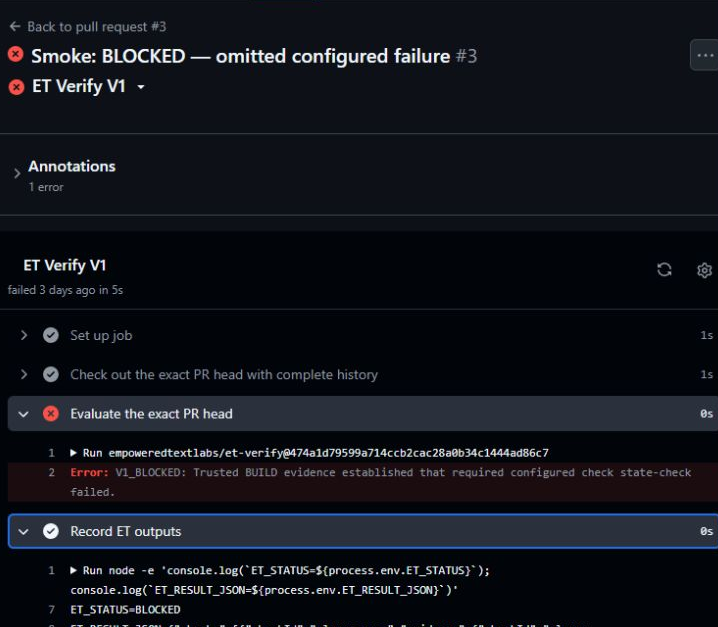
Leaving a required check out of the report does not make the failure disappear.
ET Verify can catch the omission by evaluating the team’s complete configured check set; if an omitted configured check fails, the result remains BLOCKED rather than being softened into uncertainty.
The evidence belongs to different work
A result from an older or different version of the work does not silently count for the current pull request.
ET Verify can surface the mismatch because the declaration, repository state, and check evidence must belong to the exact evaluated work.
The report cannot be established
When required evidence is missing or incomplete, ET Verify reports uncertainty instead of treating the report as established.
ET Verify returns REVIEW REQUIRED—not automatic success and not automatically BLOCKED.
How it works
ET Verify adds a focused verification step to the agent-assisted pull-request process your team already uses.
Your team chooses the TEST and BUILD checks ET Verify should require.
Your coding agent commits a small completion report with its work.
ET Verify runs on the pull request and compares that report with Git and the configured check evidence for the exact work under review.
GitHub shows the result. Your team decides what to do with it.
See how the verification is bound to the work
The trusted configuration lives in .et-verify/checks.json, and the coding agent commits .et-verify/acceptance.json.
Trusted requirements are read from the evaluated base.
The agent commits the structured declaration.
ET Verify identifies the exact pull-request head and merge base.
Actual changed paths and configured check evidence are produced.
The report and evidence are compared and bound to the same work.
The organization retains the consequence.
Verify checks the report. It does not certify the code.
- It does not determine feature quality.
- It does not determine test sufficiency.
- It does not establish security.
- It does not make the merge decision.
What engineers actually see
ET Verify appears as a check inside the GitHub pull request, alongside the repository’s other checks.
It returns ACCEPTED, REVIEW REQUIRED, or BLOCKED, with an issue or reason and relevant check or evidence information.
Three results
Missing evidence and contradictory evidence are different problems. ET Verify treats them differently.
ACCEPTED
The report checks out against the evidence Verify uses.
This is not general code approval.
REVIEW REQUIRED
Verify can’t establish the report yet.
Something required is missing, incomplete, stale, or not bound to the exact work. That does not by itself mean the work failed.
BLOCKED
The report or a configured requirement conflicts with the evidence.
This does not prove malicious intent or general code failure.
What happens next
Each result points to a practical next step while leaving review and merge authority with your team.
ACCEPTED
Continue your team’s normal review process. ET Verify established only the bounded report it checks.
REVIEW REQUIRED
Correct or supply what Verify could not establish, then update the pull request and let Verify evaluate the new state. A plain rerun of the same head does not correct a missing or incorrect committed declaration.
BLOCKED
Fix the failing configured check or correct the conflicting declaration, then update the pull request and let Verify evaluate the new state.
ET Verify identifies the issue. It does not apply the fix.
Public alpha / install
ET Verify is open source and available now as a public GitHub Action alpha.
Public repository: https://github.com/empoweredtextlabs/et-verify
Immutable Action coordinate:
uses: empoweredtextlabs/et-verify@474a1d79599a714ccb2cac28a0b34c1444ad86c7License: Apache-2.0
Use the setup guide to add the workflow, choose the checks ET Verify should require, and instruct the coding agent to commit its declaration.
- The supported public alpha is the GitHub Action; there is no npm installation.
- The CLI is not part of the supported public alpha.
- A pull-request workflow and trusted check configuration are required.
- Use the immutable full-SHA Action pin shown above.
Technical reference: Read the technical reference
Secondary setup help: abram@empoweredtextlabs.com